After recently releasing magit-git-toolbelt, a Transient interface for git-toolbelt in magit, I’m happy to share another Magit extension I’ve been working on – magit-gh, an Emacs package that integrates the GitHub CLI (gh) into Magit. Similar to my former package, it provides a Transient menu interface to list, checkout, and view pull requests directly from Emacs without leaving your workflow.
Why I wrote this Link to heading
If you work with pull requests on GitHub every day, you know the git checkout dance: you’re deep in flow and in a Magit buffer, you need to check on a PR, so you switch to a browser, find the repo, navigate to the PR tab, and then maybe come back to checkout the branch in eshell or even your terminal. It’s a small context switch, but it adds up.
Forge has been the defacto and established solution for this and it’s a fantastic and comprehensive package for interacting with Git forges from within Magit – it has all the bells and whistles for this workflow. If you need deep integration – tracking issues, managing pull requests, reading and writing comments, all stored locally in a light database – Forge is the right tool. I would highly recommend Forge over this package if that is your use case.
magit-gh takes a different approach. It delegates to the GitHub CLI (gh) for all GitHub interaction, which means:
- No local database – Forge maintains a local SQLite database via
emacsql, which can be tricky to set up (compiling native modules, resolving binary availability issues).magit-ghstores nothing locally. - No token management – Forge requires a GitHub personal access token stored in your
authinfofile (ideally encrypted with GPG).magit-ghpiggybacks ongh auth login, which you have already configured from authenticating the first time. - Minimal dependencies – just Magit, Transient, and the
ghCLI.
The trade-off is that magit-gh is far less featureful than Forge. It is intentionally a lightweight alternative for users who primarily want to list, checkout, and view pull requests without additional setup overhead.
Installation Link to heading
You’ll need the GitHub CLI installed and authenticated first:
# macOS
brew install gh

# Linux (Fedora / RHEL / CentOS)
sudo dnf install gh

# Then authenticate
gh auth login
Then install magit-gh from MELPA:
M-x package-install RET magit-gh RET
Or with use-package:
(use-package magit-gh
  :ensure t
  :after magit)
Usage Link to heading
From any Magit status buffer, press , to bring up the magit-gh Transient menu. You can also invoke it directly with M-x magit-gh. The menu is organized into Pull Request commands:
magit-gh
└── Pull Requests
    ├── l  List open PRs
    ├── c  Checkout PR
    └── v  View PR in browser
When you list open PRs (l), a dedicated buffer opens showing PR number, title, author, and branch name. From that buffer you can checkout a PR with RET or c, open it in your browser with v, refresh the list with g, or close the buffer with q.
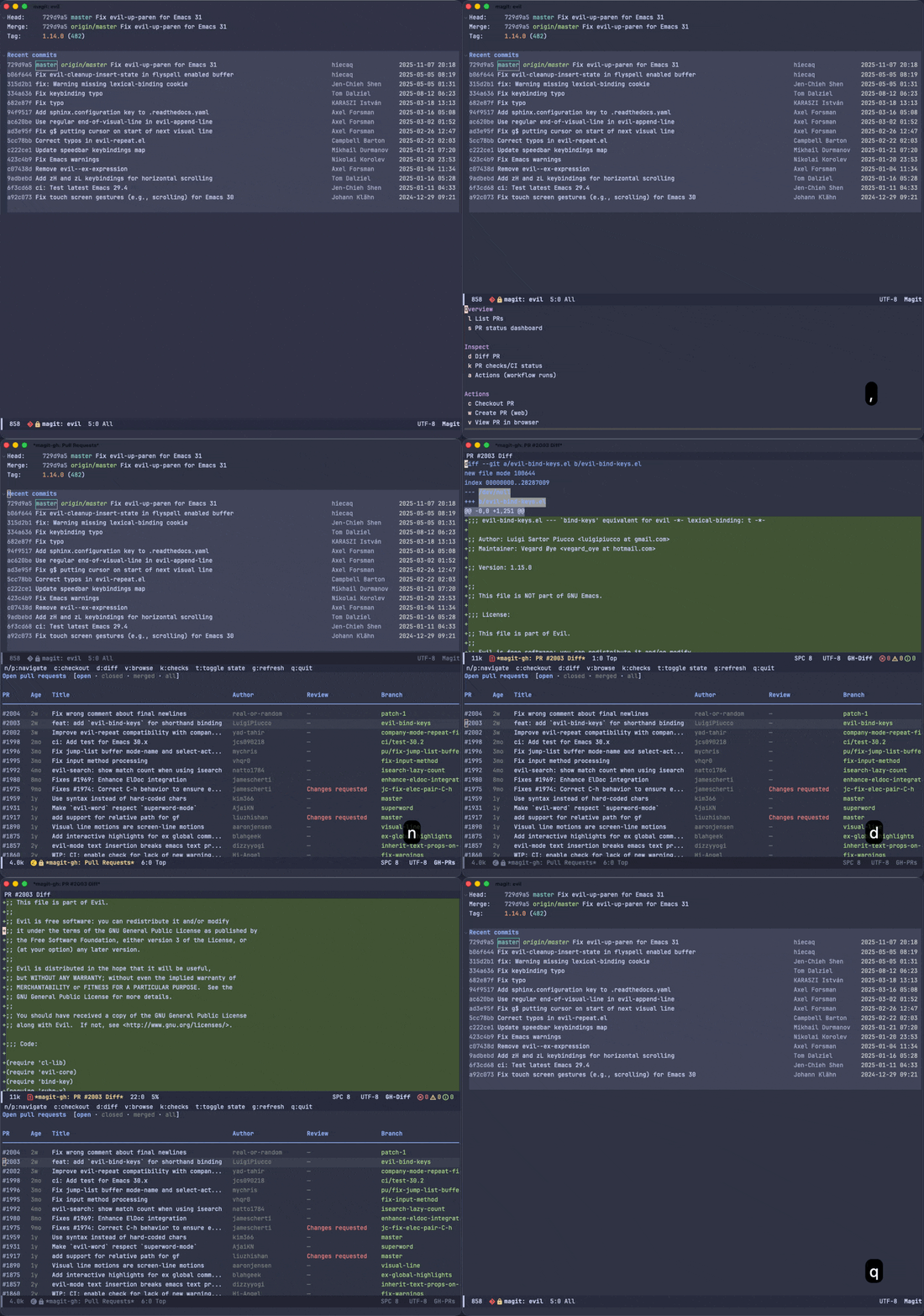
If you don’t like the , key binding, you can set a custom one. Note that the variable must be set before the package loads so it needs to be in the init section:
(use-package magit-gh
  :ensure t
  :after magit
  :init
  (setq magit-gh-key ";")) ; Example setting key to ";" instead of the default ","
To increase the number of PRs fetched (default 30):
(use-package magit-gh
  :ensure t
  :after magit
  :custom
  (magit-gh-pr-limit 50))
What’s next Link to heading
Aside from bugs and visual improvements to the TUI, I would consider this package mostly feature complete. The current feature set is intentionally small, but I have plans to add support for listing closed/merged PRs, creating new PRs, viewing diffs and CI status, and eventually issue management – all through the gh CLI. You can track progress on the GitHub repo.
If you use Magit and the GitHub CLI, give magit-gh a try! It’s available on MELPA and the source is on GitHub. Contributions and feedback are always welcome! Hope this is useful!