I’ve been looking for (or rather, chasing!) the right note-taking workflow in Emacs for over a decade now. Back in 2013, I wrote about setting up Deft mode with Org-Mode and it was my attempt at bringing that Notational Velocity-style simplicity into Emacs, and I used it for a long time. I genuinely liked Deft, but it’s no longer actively maintained, and the same goes for Zetteldeft which was built on top of it as an alternative successor. Since then, I’ve tried the other major players – org-roam, Denote, and a handful of others. They’re all extremely impressive and comprehensive packages that do more than I could ever ask for, but none of them ever quite stuck for me. I’d set one up and more or less force myself to use it for a few weeks, and then quietly drift back to a loose pile of org files in a directory. And on my darker days, Apple Notes.
The problem was never these packages – it was more me and my typical, simple workflow that I’ve grown so used to over the years. Learning a new tool carried implicit friction points that compounded over time. Org-roam is powerful, but it is opinionated about note creation - every note needs a unique org-id property and lots of frontmatter that I often had to lookup from previous notes to even remember what to include. The whole system, when used correctly, is backed by a SQLite database via emacsql that indexes your nodes and links. That’s a lot of overhead in my candid opinion. If the database gets out of sync or emacsql has compilation issues, you’re debugging infrastructure instead of taking notes. This was another pain point of mine since I often work on multiple machines (work, personal).
On the other hand, simple tooling like ripgrep is plenty fast for searching files, and removing the database removes an entire category of things that can break – especially for newer users who are already navigating the Emacs and org-mode learning curve. Denote is a great package that uses a lot of good, well-thought-out ideas and tooling, but I found it had a higher barrier to entry and is a bit opinionated in favor of note-taking workflows that I just never adopted or used over the years. This isn’t meant to be a knock on org-roam or Denote - it’s all my preference – but I wanted something that fit how I actually work without getting in my way - and something that I knew I would use long term. The note-taking workflow I wanted is something that felt closer to just opening a folder of org files, but with the modern conveniences that tools like Obsidian offers.
So I wrote grove.el.
What it is Link to heading
Grove is an Obsidian-like note-taking mode for Emacs. One keybinding opens a full workspace with a file tree sidebar and your org notes. No external Emacs dependencies, no databases – just org files, a directory, and ripgrep.
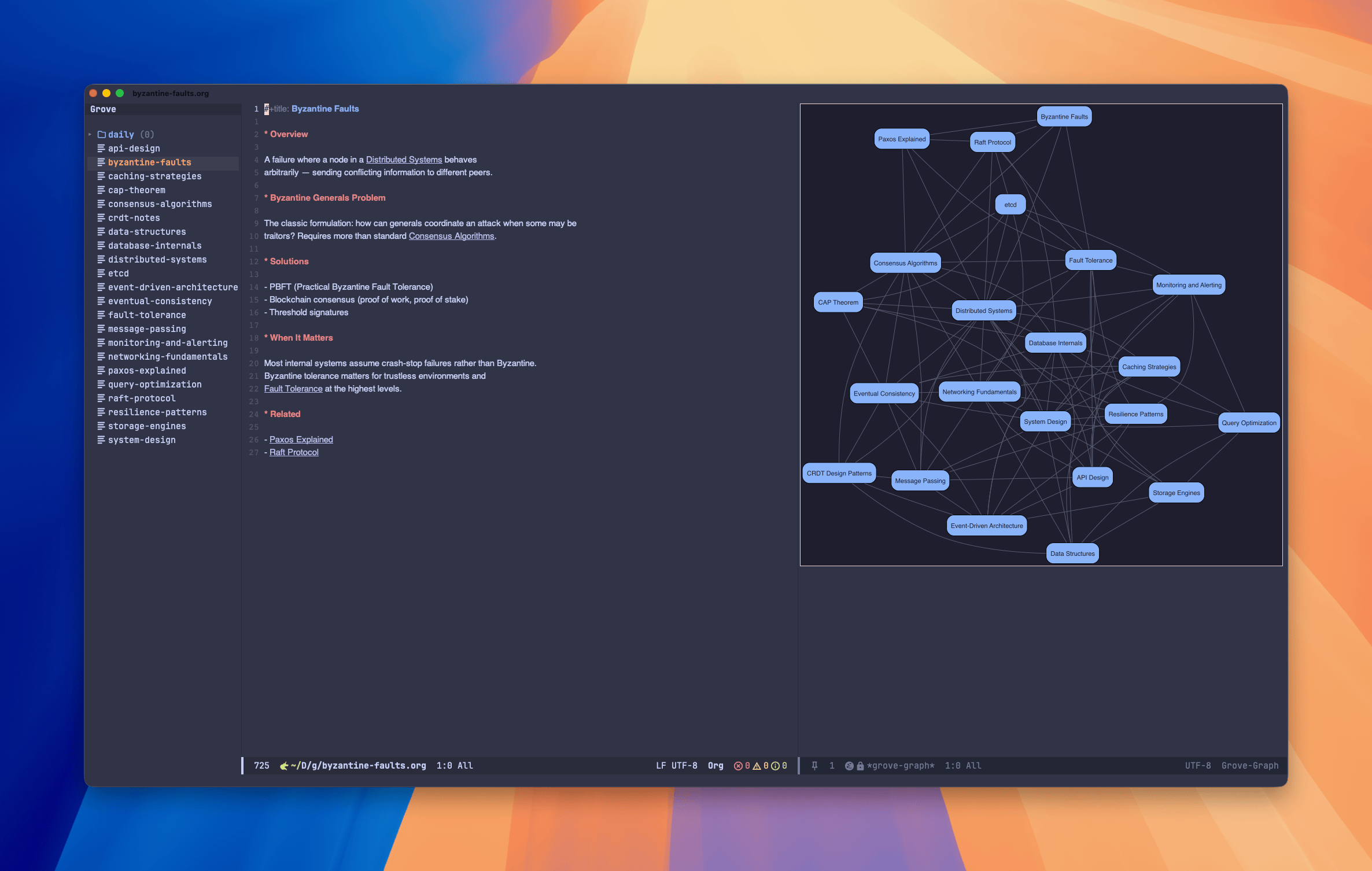
The feature set covers the things I actually want and use daily:
- File tree sidebar – expand/collapse directories, indent guides, current file tracking, item counts, and optional nerd font icons
- Quick capture – the first line becomes the title, saved straight to an inbox
- Wikilinks –
[[note title]]syntax, click to follow, creates the note if it doesn’t exist - Backlinks – ripgrep-powered, computed on demand, displayed in a side panel
- Daily notes – jump to today, yesterday, or tomorrow
- Search – full-text search via ripgrep, with optional Consult integration
- Tag search – works with both
#hashtagand org:tag:syntax - Inbox review – triage your untagged notes
- Graph view – Graphviz-powered visualization of how your notes connect
Why I wrote this Link to heading
The honest answer is that I wanted a note-taking system that I’d actually use. Every previous attempt had some piece that didn’t fit my workflow, and over time that friction compounded until I stopped using it entirely.
What I kept coming back to was how simple tools like Obsidian feels. Yes, I know - it’s basically org-mode but with a pretty GUI! But you open a vault, you see your files, you write notes with wikilinks, and the tool stays out of your way. The graph view is a nice addition - nothing new, but something that I knew I wanted to try and recreate in a less complex fashion. The sidebar is useful visually - often times it is very beneficial to focus on a single, solo buffer, but when it comes to note taking, visually seeing the other notes can add extra context without overloading you - enabling you to add categorization and linking with minimal overhead. My intention was to create something that doesn’t prescribe a methodology - you can do Zettelkasten, GTD, or just free-form notes, and Grove doesn’t care. I wanted that same feeling and purpose that I get when I’m in Emacs, where I already spend a good portion of my day.
Grove is intentionally less opinionated than many of the existing note-taking packages in the Emacs ecosystem. There’s no enforced file naming scheme, no required metadata format, no database to maintain. Your notes are org files in a directory. If you stop using Grove tomorrow, your notes are still just org files. I think that matters most in the end - when you stop using a tool, the underlying bits don’t change, including yourself.
At the same time, I wanted it to be batteries included. One of the barriers I’ve seen with Emacs note-taking setups is that getting everything working – the sidebar (especially this!), the linking, the search, the capture workflow - it all requires stitching together multiple packages and a fair amount of configuration. Grove bundles all of that into a single package with sensible defaults. The goal is that a new user can install it, point it at a directory, and have a complete note-taking workspace immediately. Whether you’re new to Emacs or have been using it for many, many years, the setup cost is minimal and investment low.
Installation Link to heading
Grove requires Emacs 29.1+ and ripgrep. Graphviz is optional for the graph view, and Consult is optional for enhanced search.
Grove is currently in review for MELPA. Once it is approved and merged, you’ll be able to install it with:
M-x package-install RET grove RET
Or with use-package:
(use-package grove
  :ensure t
  :custom
  (grove-directory "~/notes"))
In the meantime, you can install it manually by cloning the repo:
git clone https://github.com/jonathanchu/grove.git
(use-package grove
  :load-path "path/to/grove"
  :custom
  (grove-directory "~/notes"))
Usage Link to heading
The entry point is C-c v v to open the Grove workspace, or M-x grove-open. From there, the full keybinding set lives under the C-c v prefix:
grove
├── C-c v v  Open workspace
├── C-c v q  Close workspace
├── C-c v c  Quick capture
├── C-c v f  Find note
├── C-c v s  Search notes
├── C-c v d  Daily note (today)
├── C-c v y  Daily note (yesterday)
├── C-c v t  Daily note (tomorrow)
├── C-c v b  Show backlinks
├── C-c v #  Search by tag
├── C-c v i  Inbox review
├── C-c v l  Insert wikilink
└── C-c v g  Graph view
The file tree sidebar tracks your current file, and you can expand/collapse directories with TAB. Quick capture (C-c v c) opens a buffer where you type your note - the first line becomes the filename and it’s saved directly to your inbox for later triage.
What’s next Link to heading
I have a few things I’d like to explore next – note templates, tag autocomplete, and some refinements to the graph view to make it interactive. These are definitely nice-to-haves, but I would only want more time to think about some of these more thoughtfully as complexity increases with features like interactive graph views. But the core is solid and I’ve been using it daily as my primary note-taking system, which has been the real test.
If you’ve been looking for a note-taking setup in Emacs that doesn’t require much configuration or revamping your notes workflows, give Grove a try! Feedback and contributions are always welcome.